https://spring.io/projects/spring-cloud-aws
Spring Cloud for Amazon Web Services
Spring Cloud for Amazon Web Services is a community-run project. The website is https://awspring.io/ and the source repository is located at https://github.com/awspring/spring-cloud-aws. Spring Cloud for Amazon Web Services, eases the integration with host
spring.io
블로그를 참고하여 S3를 모의적으로라도 적용해보고자 실습해보려고 했으나 버전이 안맞아서 라이브러리가 import 되지 않는 경우, 너무 옛날 라이브러리를 활용한다는 점에서 공식문서와 커뮤니티의 최신 릴리즈 버전을 찾아서 현재 프로젝트에 적용해보고자 한다.
일단 AWS의 S3 기본 설정은 마쳤고, accessKey와 secreyKey, 리전 정보를 가지고 있는 상황이다.
https://mvnrepository.com/artifact/io.awspring.cloud/spring-cloud-aws-s3
해당 릴리즈 버전 정보 사이트를 확인하여 5.31 기준 가장 안정적이고, 최신에 속하는 3.1.1 버전을 적용하고자 한다.

참고로 build.gradle.kts 파일로, 코틀린 형식으로 작성되는 gradle 문법임을 참고해야한다. gradle DSL을 groovy가 아닌 kotlin을 선택한 이유는 코틀린 언어의 장점이 적용되어 타입 안정성이나, 가독성 측면에서 우수하고, 기존 코드와도 호환성이 높다보니 활용하게 되었다.
[ https://docs.gradle.org/current/userguide/kotlin_dsl.html 공식문서 참고]
Springboot 3.x를 활용하다보니 Spring Cloud AWS 3.0.0 이상 버전을 사용을 권장하고 있다.
- 파일 업로드 방식
파일을 업로드 하는 방식은 크게 Multipart File, Base64 방식이 존재한다.
Multipart File은 파일을 업로드할 때, 파일을 여러 부분으로 분할하여 전송하는 방식이고, Base64는 파일을 8비트 이상의 바이너리 데이터를 ASCII 문자로 변환하여 텍스트 데이터로 전송하는 방식이다.
결론적으로는 Multipart File 방식을 적용하려고 한다.
Base64 같은 경우, 인코딩을 하게 될 시, 원래 바이너리 데이터보다 크기가 33% 정도 증가한다. 현재 프로젝트에서 고화질의 이미지를 업로드 하는 경우는 없지만, 버전업을 하거나 새로운 디자인 기획으로 변경될 수 있다는 점을 최대한 고려해보면 Base64 인코딩을 채택하지 않았다. 추가적으로, 인코딩과 디코딩 작업에 리소스가 더 필요하다는 단점이 존재했다.
Multipart File은 대용량 파일 전송을 작은 부분으로 나누어 전송이 가능하고, 이어받기가 가능하며, 여러 부분을 동시에 전송함으로써 전체 파일 전송 시간을 단축시킬 수 있다는 장점이 있기 때문에 Multipart File 방식을 적용하고자 한다.
** 파일 업로드 전체 코드 **
@Configuration
public class AwsConfig {

    @Value("${cloud.aws.credentials.access-key}")
    private String accessKey;

    @Value("${cloud.aws.credentials.secret-key}")
    private String accessSecret;

    @Value("${cloud.aws.region.static}")
    private String region;

    @Bean
    public S3Client s3Client() {
        return S3Client.builder()
                .credentialsProvider(this::awsCredentials)
                .region(Region.of(region))
                .build();
    }

    private AwsCredentials awsCredentials() {
        return new AwsCredentials() {
            @Override
            public String accessKeyId() {
                return accessKey;
            }

            @Override
            public String secretAccessKey() {
                return accessSecret;
            }
        };
    }
}
@RestController
@RequiredArgsConstructor
@RequestMapping("/s3")
public class S3Controller {
private final S3Service s3Service;
@PostMapping("/upload")
public String uploadFile(
@RequestPart(value = "file") MultipartFile multipartFile,
@RequestPart(value = "dto") S3UploadRequestDto dto
){
return s3Service.uploadFile(multipartFile, dto);
}
}
public class AwsCommonUtils {
    public static final String FILE_EXTENSION_SEPARATOR = ".";
    public static String buildFileName(Long itemId, String originalFileName) {
        int fileExtensionIndex = originalFileName.lastIndexOf(FILE_EXTENSION_SEPARATOR); // 확장자 시작 인덱스
        String fileExtension = originalFileName.substring(fileExtensionIndex); // ex) ".jpg", ".jpeg"
        String fileName = originalFileName.substring(0, fileExtensionIndex); // 파일명
        return itemId + "_" + fileName + fileExtension; // ex) 1_모자1.jpg
    }

    public static String getFileName(String originalFileName) {
        int fileExtensionIndex = originalFileName.lastIndexOf(FILE_EXTENSION_SEPARATOR);
        return originalFileName.substring(0, fileExtensionIndex); //파일 이름
    }
}
import Itstime.planear.exception.PlanearException;
import Itstime.planear.shop.dto.request.S3UploadRequestDto;
import lombok.RequiredArgsConstructor;
import lombok.extern.slf4j.Slf4j;
import org.springframework.beans.factory.annotation.Value;
import org.springframework.http.HttpStatus;
import org.springframework.stereotype.Service;
import org.springframework.web.multipart.MultipartFile;
import software.amazon.awssdk.core.sync.RequestBody;
import software.amazon.awssdk.services.s3.S3Client;
import software.amazon.awssdk.services.s3.model.GetUrlRequest;
import software.amazon.awssdk.services.s3.model.PutObjectRequest;

import java.io.IOException;
import java.io.InputStream;

import static Itstime.planear.shop.utils.AwsCommonUtils.buildFileName;

@Slf4j
@Service
@RequiredArgsConstructor
public class S3Service {


    private final S3Client s3Client;

    @Value("${cloud.aws.s3.bucket}")
    private String bucket;

    public String uploadFile(MultipartFile multipartFile, S3UploadRequestDto dto){
        validateFileExists(multipartFile); // 업로드 파일 유효성 검증
        String fileName = buildFileName(dto.itemId(), multipartFile.getOriginalFilename());
        String filePath = dto.bodyPart() + "/" + fileName;  // 부위별로 폴더 구조를 생성을 위해

        try (InputStream inputStream = multipartFile.getInputStream()) {
            PutObjectRequest putObjectRequest = PutObjectRequest.builder()
                    .bucket(bucket)
                    .key(filePath)
                    .contentType(multipartFile.getContentType())
                    .contentLength(multipartFile.getSize())
                    .acl("public-read")
                    .build();
            s3Client.putObject(putObjectRequest, RequestBody.fromInputStream(inputStream, multipartFile.getSize()));

        }catch (IOException e){
            log.error(String.valueOf(e));
            throw new PlanearException("잠시 문제가 생겼어요 문제가 반복되면, 연락주세요", HttpStatus.BAD_REQUEST);
        }
        GetUrlRequest getUrlRequest = GetUrlRequest.builder()
                .bucket(bucket)
                .key(filePath)
                .build();
        return s3Client.utilities().getUrl(getUrlRequest).toString() ;
    }

    private void validateFileExists(MultipartFile multipartFile){
        if(multipartFile.isEmpty()){
            log.error("파일이 없습니다.");
            throw new PlanearException("잠시 문제가 생겼어요 문제가 반복되면, 연락주세요", HttpStatus.BAD_REQUEST);
        }
    }
}
- Exception 발생 히스토리
HttpMediaTypeNotSupportedException
1. Content-Type 'multipart/form-data;boundary=--------------------------659747504732110412194670;charset=UTF-8' is not supported
업로드 컨트롤러를 작성할 때 다음과 같이 작성했다.
@PostMapping("/upload")
public String uploadFile(
        @RequestPart(value = "file") MultipartFile multipartFile,
        @RequestBody S3UploadRequestDto dto
        ){
    return s3Service.uploadFile(multipartFile, dto);
}
Postman을 활용하여 업로드 테스트를 진행하였다. form-data에는 file을 업로드하고, raw 에는 requestDto 값들을 작성하여, HttpMediaTypeNotSupportedException 예외를 마주했다.
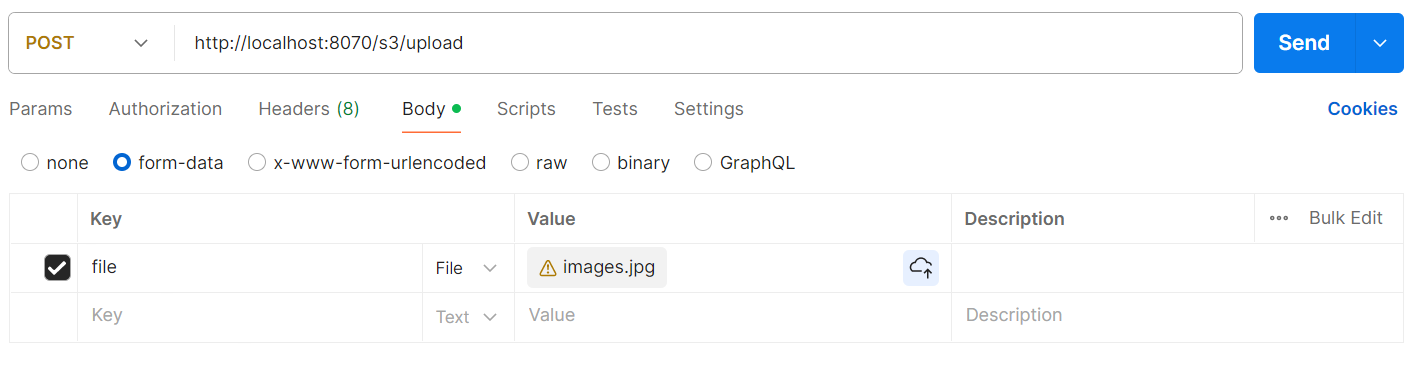
form-data에 .jpg를 업로드하니 Header에 Content-type이 'application/json' 이 아닌 ' multipart/form-data; boundary=<calculated when request is sent> '로 되어있었다. form-data와 raw를 동시에 담은 요청이 진행이 안되는 것 같았다. 웹 서핑 결과 " 서버에서 multipart-form data Content-type을 받을 때는 @RequestBody가 아닌 @RequestPart 애노테이션을 사용해 주어야 합니다. " 라는 결론에 이르렀고, raw json데이터를 value에 저장하여 요청을 했다.
2. Content-Type 'application/octet-stream' is not supported

@PostMapping("/upload")
public String uploadFile(
        @RequestPart(value = "file") MultipartFile multipartFile,
        @RequestPart(value = "dto") S3UploadRequestDto dto
        ){
    return s3Service.uploadFile(multipartFile, dto);
}
form-data에 모두 담기 위해 RequestPart 어노테이션으로 dto를 받도록 작성했다. 하지만 갑자기 ContentType 에러가 발생했다. 'Content-Type 'application/octet-stream' is not supported'
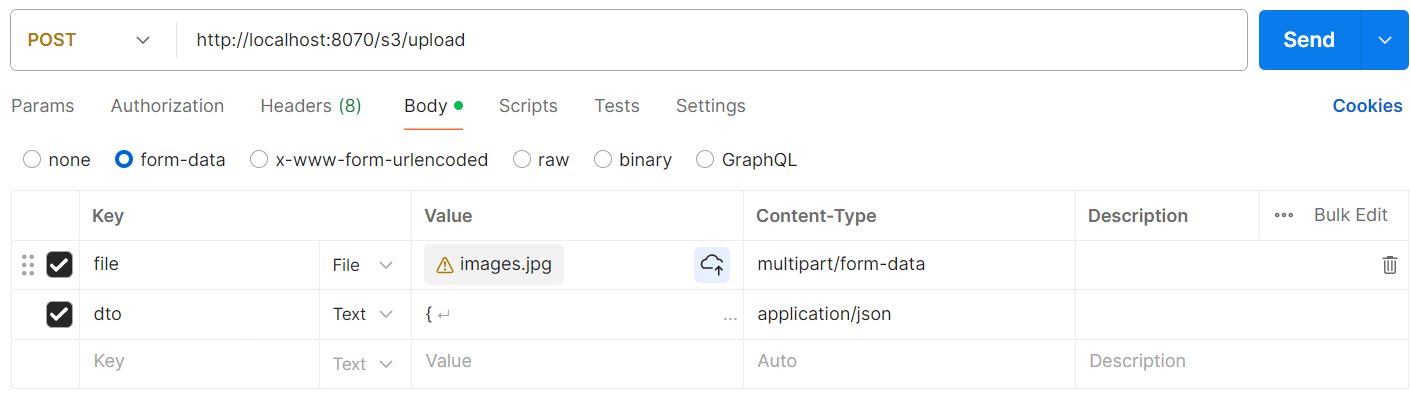
Content-Type이 AUTO로 저장되어있었고, 각각의 타입에 맞게 수동으로 맞춰주었다.
결과적으론 이미지 업로드 프로세스가 잘 동작하였다.


구상했던 아이템 착용부위 별 폴더 아래에 이미지파일이 저장되게 성공하였다.
'Backend' 카테고리의 다른 글
| [Springboot] Logback (1) | 2024.06.30 |
|---|---|
| [Springboot] Sentry 에러 로그 수집기 설정하기 (1) | 2024.06.24 |
| [ IntelliJ ] Springboot 초기설정 - 빌드 방식 차이점 (0) | 2024.05.10 |
| [Springboot] List 순회 도중 ConcurrentModificationException 발생 (1) | 2024.04.21 |
| [Springboot] Postmapping vs Putmapping vs Patchmapping (1) | 2024.04.08 |


